Guide · Integrations
How to Add M-Pesa to Your Website or App with Daraja
Astraque Softwares20 min read
If you are building a website or application for Kenyan customers, M-Pesa is one of the most useful payment methods you can integrate.
The experience can be simple for the customer: they enter their phone number, receive an M-Pesa prompt, enter their PIN and continue with their purchase.
Behind that simple interaction is Safaricom Daraja, the developer platform that allows websites, mobile apps and business systems to communicate with M-Pesa.
Safaricom currently describes Daraja 3.0 as the platform that connects M-Pesa APIs to web and mobile applications. Its APIs cover services including M-Pesa Express, Customer to Business, Business to Customer, transaction status, account balance, reversals and several business-payment operations.
If you want your website to accept M-Pesa properly, the goal should not simply be to display a Till Number.
The goal is for your software to know when a customer has paid and automatically continue the transaction.
What is the M-Pesa Daraja API?
Daraja is Safaricom's developer platform for accessing M-Pesa functionality through APIs.
An API allows two software systems to communicate with each other.
In this case, your website, mobile application, POS or ERP communicates with Safaricom's M-Pesa systems.
That means your software can perform tasks such as:
- request an M-Pesa payment from a customer
- receive notification when a customer pays
- check the status of a transaction
- send money to customers where the business has the appropriate B2C setup
- query supported business-account information
- connect payments to orders, invoices or customer accounts
Safaricom's APIs use REST-style HTTP requests and JSON data, making them suitable for practically any modern backend technology. Safaricom currently provides examples for technologies including Node.js, Python, PHP, Java, Ruby and cURL.
The important word here is backend.
Your M-Pesa credentials should not be sitting inside JavaScript delivered directly to the customer's browser.
Sensitive Daraja credentials belong on your server.
The most familiar Daraja integration is STK Push
For most online shops and customer-facing applications, M-Pesa Express is probably the Daraja feature users recognize most easily.
It is commonly referred to as STK Push.
Safaricom currently describes M-Pesa Express as allowing a business to initiate a Buy Goods or Paybill payment from the customer's M-Pesa account to the business's Till or Paybill.
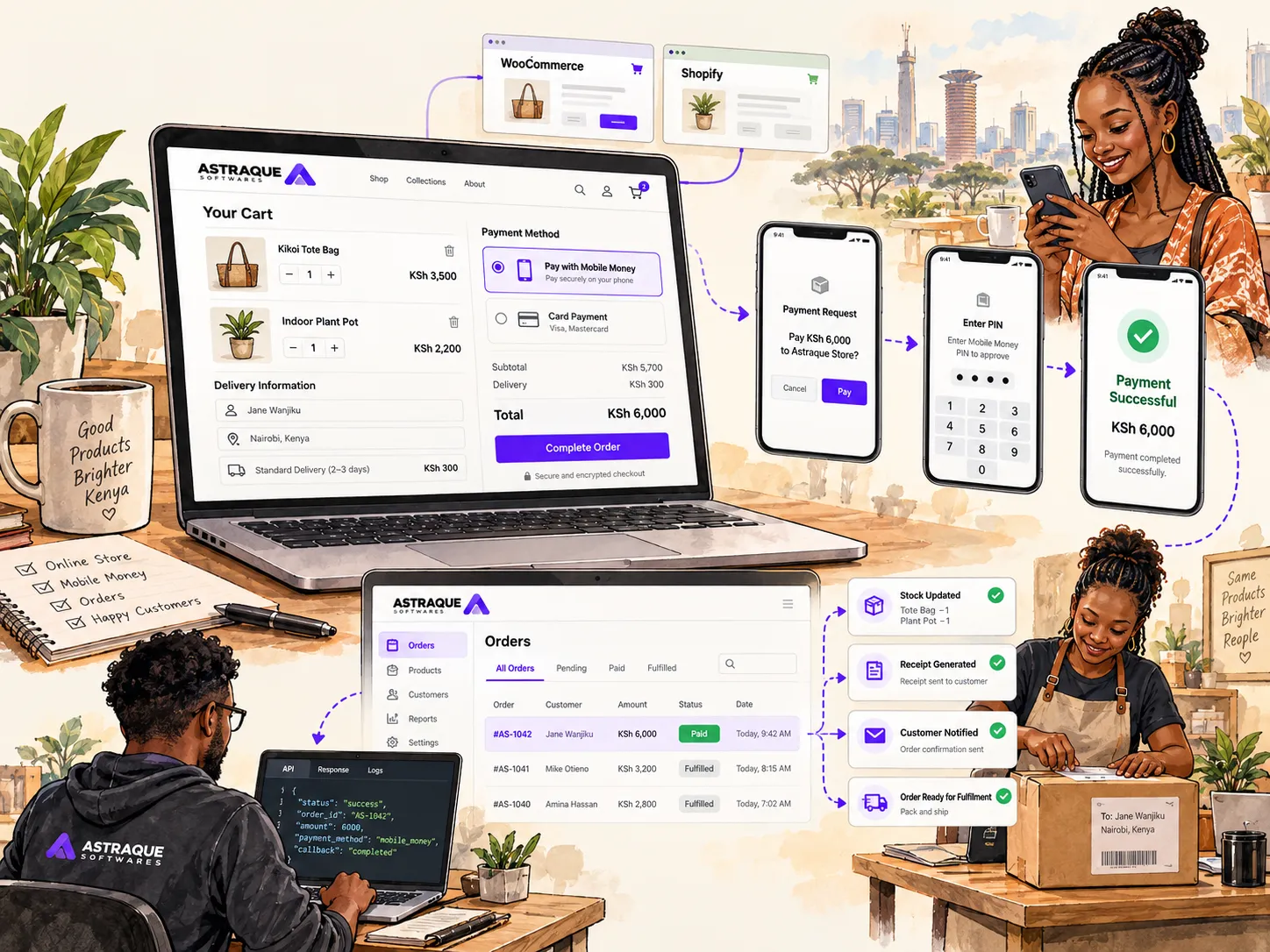
The customer experience can look like this:
- A customer adds a product to their cart.
- They proceed to checkout.
- They choose M-Pesa.
- They enter their mobile number.
- Your server sends a payment request through Daraja.
- An M-Pesa prompt appears on the customer's phone.
- The customer enters their M-Pesa PIN.
- M-Pesa processes the transaction.
- Your application receives the result.
- The order is marked as paid if the payment succeeded.
From the customer's perspective, there is no need to copy a Till Number, manually enter an amount or send your business a payment screenshot.
That makes STK Push particularly useful for e-commerce websites, booking systems, customer portals and mobile applications.
You need a Daraja developer account
Development normally starts on the Safaricom Developer Portal.
You create a Daraja account and then create a sandbox application.
Safaricom provides sandbox credentials so developers can build and test an integration without using real customer money.
The sandbox gives your application credentials commonly referred to as the:
- Consumer Key
- Consumer Secret
These credentials are used to obtain an access token.
That access token is then used when calling the other Daraja APIs.
Safaricom currently uses OAuth 2.0 client credentials for authorization, and its documentation states that access tokens expire after approximately 3,600 seconds, or one hour.
Your application therefore should not be designed around manually copying a token from the developer portal every hour.
The backend should request and manage authentication automatically.
Keep your Daraja credentials on the server
This is one of the most important implementation details.
Do not place your:
- Consumer Secret
- passkey
- API passwords
- production credentials
inside frontend JavaScript or a mobile application bundle where users can retrieve them.
The browser or mobile app should communicate with your backend.
Your backend then communicates with Daraja.
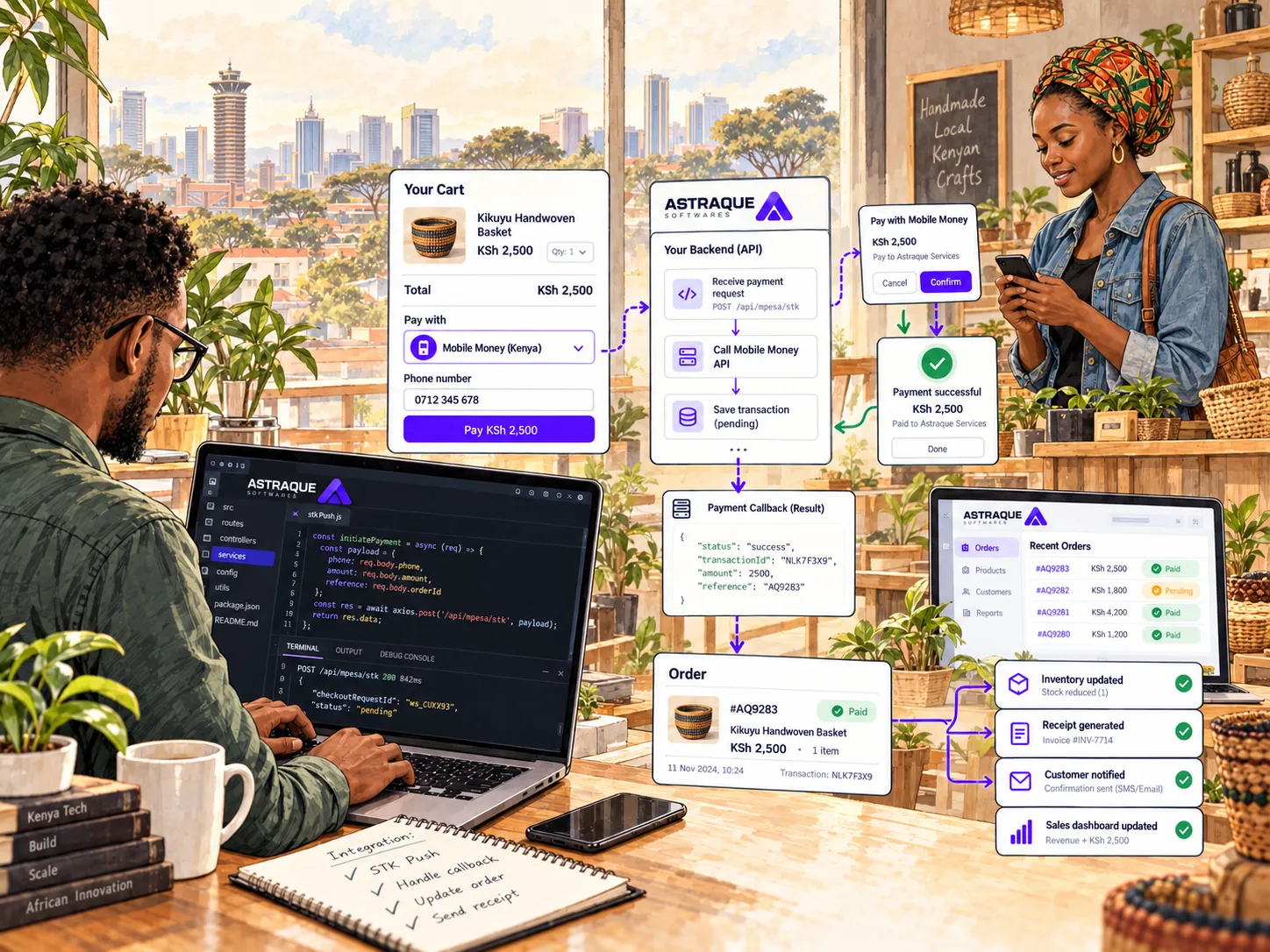
A basic architecture might look like this:
Customer → Website/App → Your Backend → Daraja → M-Pesa
The result comes back through your server before your application updates the customer's order.
This gives you much more control over authentication, payment verification, logging and security.
How STK Push works behind the scenes
Suppose a customer wants to purchase something worth KSh 4,500.
Your website creates an order first.
For example:
Order: AST-1049
Amount: KSh 4,500
Status: Awaiting Payment
Your backend then sends the appropriate payment request to M-Pesa through Daraja.
The customer's phone receives the prompt.
At this stage, your application should not mark the order as paid simply because Safaricom accepted the request.
That initial response only tells you that the payment request has been accepted for processing.
M-Pesa APIs are asynchronous: transaction results are delivered to callback or result URLs after processing. Safaricom's Daraja documentation explicitly requires publicly accessible HTTP listeners for these responses.
So your order should remain something like:
Payment Processing
until your system receives the actual transaction outcome.
The callback is where your system learns what happened
A callback URL is an endpoint on your server that another system can call.
For example:
https://yourbusiness.co.ke/api/mpesa/callback
After M-Pesa processes a transaction, Safaricom sends the result to the callback URL associated with the request.
Your server receives that information and processes it.
If the transaction succeeded, your application can then:
- mark the order as paid
- store the M-Pesa transaction reference
- update inventory
- create the customer's receipt or invoice
- trigger fulfilment
- send a confirmation notification
- update management reports
If it failed, your application can keep the order unpaid and allow the customer to try again.
This callback-based architecture is one of the most important concepts to understand when building a reliable M-Pesa integration.
Do not trust the browser to tell you that a payment succeeded
A common implementation mistake is allowing the customer's browser to decide whether an order has been paid.
That is unsafe.
A user controls their browser.
A developer can open the browser console.
Requests can be modified.
Frontend state can be changed.
Your backend should decide whether a payment succeeded based on trusted information received from the payment provider.
A good pattern is:
Customer begins payment
↓
Backend creates pending payment
↓
Backend initiates M-Pesa request
↓
Customer authorizes payment
↓
Safaricom sends callback
↓
Backend verifies and records result
↓
Order changes to paid
↓
Frontend displays success
The payment record in your database should be the source of truth.
What is the C2B API?
Not every M-Pesa payment starts from your website.
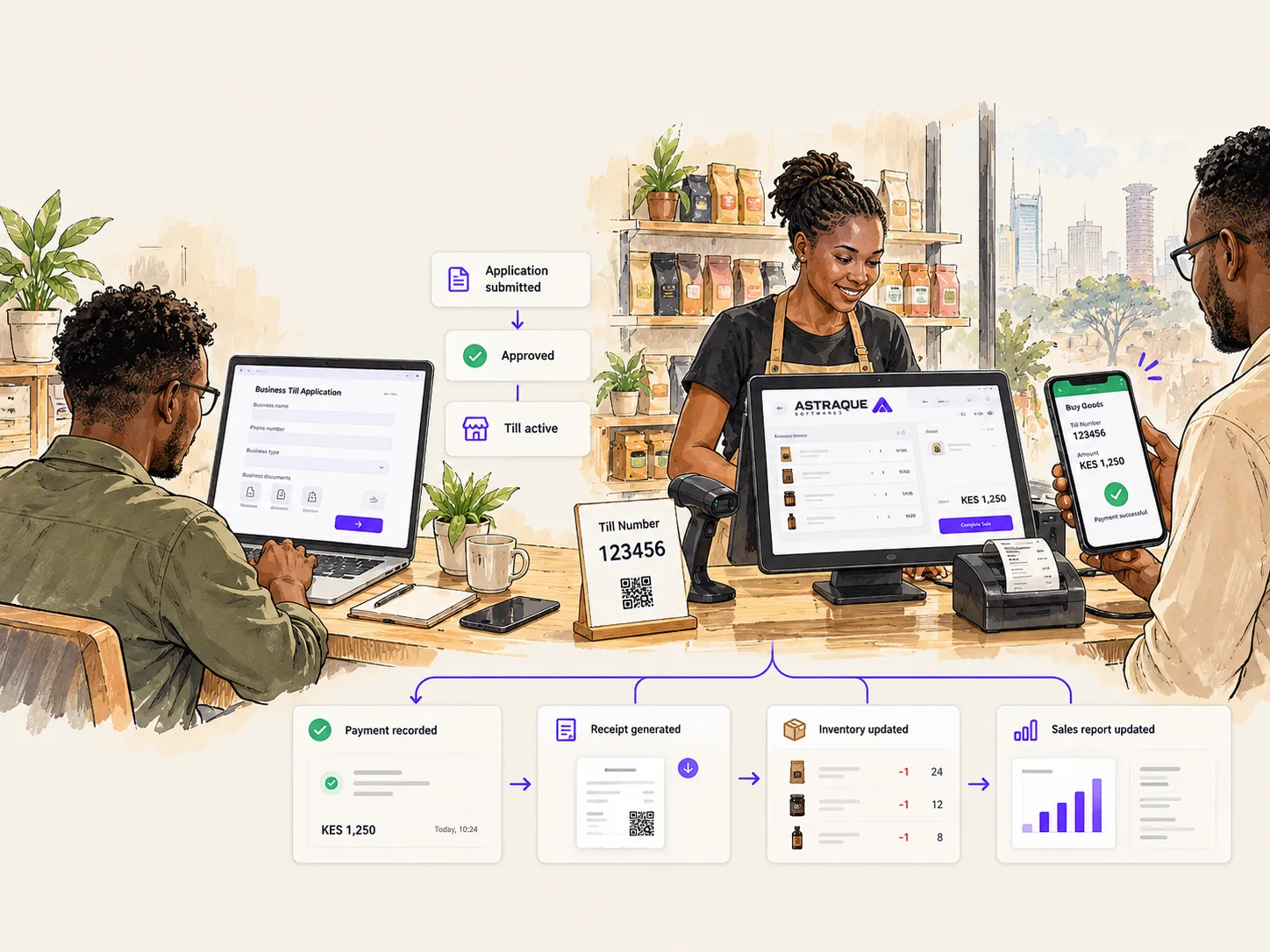
A customer can also manually pay your Till or Paybill from their phone.
This is where the Customer to Business API, or C2B, becomes useful.
Safaricom describes C2B as allowing businesses to receive real-time API notifications for payments made to their Till or Paybill.
For example, a customer could manually:
- Open M-Pesa.
- Choose Buy Goods.
- Enter your Till Number.
- Enter KSh 2,500.
- Complete the payment.
Your application can still receive the transaction automatically.
You do not have to depend on someone watching an SMS on the Till phone.
Confirmation and validation URLs
The C2B API supports callback URLs for incoming payments.
Safaricom currently documents two important URLs:
Confirmation URL
Receives information after a successful payment has been completed.
Validation URL
Can be used where a merchant wants its system to validate certain payment details before the payment is accepted.
Safaricom notes that external C2B validation is optional and must be activated for the merchant account.
Validation can be useful for a Paybill system.
Imagine a customer enters account number:
TENANT-9002
Your application could check whether that account actually exists before accepting the transaction.
For many businesses, however, the confirmation callback is the most important part because it provides the information required to reconcile the payment.
What information does C2B provide?
Safaricom's current C2B documentation shows payment notifications containing information including:
- transaction type
- M-Pesa transaction ID
- transaction time
- transaction amount
- business shortcode
- bill reference number for applicable Paybill payments
- organization account balance
- customer information in the form provided by the current API version
The exact payload can depend on the API version and product configuration.
This information allows your system to associate an incoming M-Pesa payment with something meaningful inside your application.
For example:
Payment received
KSh 15,000
Account reference
INV-8291
Your application searches for invoice INV-8291.
It finds the invoice.
The amount matches.
The invoice is automatically marked as paid.
That is considerably better than someone manually reading M-Pesa messages at the end of the day.
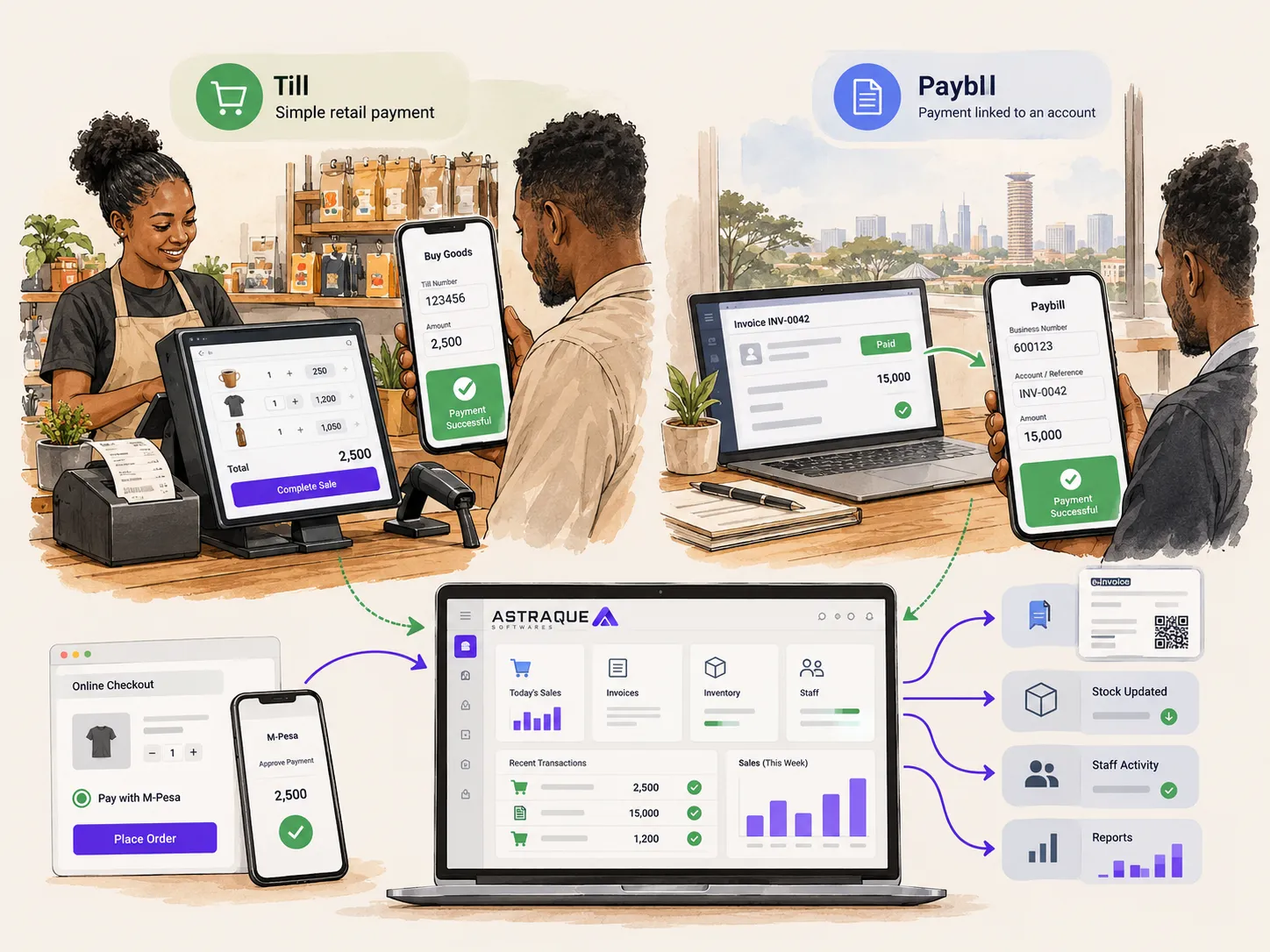
Till and Paybill can both be integrated
Daraja is not only for Paybill Numbers.
Safaricom's C2B documentation supports both Buy Goods and Paybill transaction types. In its sandbox simulator, CustomerBuyGoodsOnline represents a Till payment while CustomerPayBillOnline represents a Paybill payment.
This means businesses can build automated payment workflows around either product.
The main difference is often the business process.
A Till works naturally when a customer is paying for a sale that is already known by your system.
A Paybill becomes particularly useful when the customer needs to provide an account or reference number.
What if the callback never reaches your server?
Your payment integration needs to assume that networks can fail.
A callback might be delayed.
Your server might temporarily be unavailable.
A deployment could happen at an unfortunate moment.
You therefore need a reconciliation strategy.
Safaricom provides a Transaction Status API, which it describes as a secondary reconciliation mechanism where callbacks are not received. It can query a transaction using identifiers such as the M-Pesa receipt number or Originator Conversation ID.
This means a robust application should not immediately conclude:
No callback = no payment.
It should recognize the transaction as unresolved and attempt to determine its actual state safely.
Prevent duplicate payment processing
Callbacks and retries create another important engineering problem.
Imagine Safaricom sends your callback.
Your server processes it successfully, but a networking issue causes the callback to be delivered again.
Your application must not fulfil the same order twice.
The same M-Pesa transaction reference should not create two payments.
Your payment processing should therefore be idempotent.
In practical terms, before processing a successful payment, check whether that transaction has already been recorded.
If it has, acknowledge the callback without repeating the business action.
This is particularly important when the successful transaction triggers actions such as:
- issuing tokens
- activating subscriptions
- adding wallet balances
- releasing digital products
- generating tickets
- updating customer credit
- dispatching orders
A duplicate callback should never become a duplicate product.
Store payment attempts separately from orders
Another useful design decision is separating the order from the payment attempt.
One order might have several payment attempts.
For example:
Order AST-315
Payment attempt 1 — cancelled by customer
Payment attempt 2 — timed out
Payment attempt 3 — successful
If your software assumes that every order has exactly one payment request, recovery becomes much harder.
A payment record can store information such as:
- order ID
- phone number
- amount
- payment method
- request identifier
- M-Pesa transaction ID
- current status
- failure reason
- timestamps
- callback payload
That creates a much clearer audit trail.
What about B2C?
Daraja can also move money in the opposite direction.
The Business to Customer API, or B2C, allows a business with the appropriate setup to send money to registered M-Pesa customers.
Safaricom describes B2C as its API for bulk disbursements from a business account to customers. A live implementation requires the appropriate B2C account or an eligible business account configured for disbursement.
B2C can be useful for systems that need to automate:
- customer payouts
- refunds
- commissions
- supplier or agent payments
- rewards
- approved disbursements
It should not be confused with receiving customer payments.
For a normal e-commerce checkout, you are usually thinking about M-Pesa Express or C2B.
Test everything in the sandbox first
Safaricom provides a sandbox environment specifically so developers can test without moving real money.
Use it.
Test successful payments.
Then deliberately test everything that can go wrong.
For example:
- customer cancels the prompt
- customer does not respond
- incorrect phone number
- callback reaches your server twice
- callback arrives late
- your application restarts while a payment is processing
- the order has already been cancelled
- the payment amount does not match
- callback processing fails halfway through
- a request times out
The happy path is usually the easiest part of a payment integration.
Production quality is mostly about what happens when things do not go perfectly.
Your callback endpoint must be publicly reachable
Daraja needs to reach your server.
A callback URL therefore cannot simply point to:
localhost:3000
on your development computer.
Safaricom's documentation states that your HTTP listener must be reachable to receive asynchronous responses, and it mentions tools such as Ngrok or LocalTunnel for local development.
For production, callbacks should point to your real server over HTTPS.
Safaricom also publishes API gateway IP addresses that businesses can whitelist when they want to restrict incoming callback traffic to Safaricom's documented gateways.
Because infrastructure can change, use Safaricom's current documentation rather than copying an old IP list permanently from a tutorial.
Logging matters
When M-Pesa is handling real money, debugging by guessing is not enough.
Your application should keep useful transaction logs.
At minimum, you should be able to answer:
- when was the payment initiated?
- which order was it for?
- what amount was expected?
- what request identifier was returned?
- did a callback arrive?
- what result did it contain?
- was the payment processed?
- did the business action complete?
- has this transaction already been handled?
Do not log secrets such as passwords, API credentials or full sensitive authentication values.
But do log enough transaction metadata to investigate problems.
When a customer says, "M-Pesa deducted my money but your website says unpaid," those records become extremely valuable.
Going live requires a real M-Pesa business account
A sandbox application is not enough to receive real customer payments.
Safaricom's current Daraja guidance says going live requires an eligible live M-Pesa account such as a Paybill, Till or B2C account depending on the API being used, together with the appropriate M-Pesa Portal access.
The production process involves connecting the tested Daraja application to the live business shortcode.
The exact requirements vary depending on the API and M-Pesa product.
This is why it is useful to decide early whether the business will use:
- a Till
- a Paybill
- B2C
- or a combination of products
Your payment architecture should match the actual business account.
What happens after M-Pesa is integrated?
The biggest benefit of Daraja is not the payment prompt itself.
It is what your software can do once it knows the payment succeeded.
Consider an online shop.
Before integration:
Customer pays.
Customer sends an M-Pesa message or waits.
Employee checks the Till.
Employee confirms the order.
Employee updates stock.
Employee prepares the order.
After integration:
Customer pays.
M-Pesa confirms the transaction to your server.
Your system marks the order paid.
Inventory updates.
A receipt or invoice is generated.
Staff receive the order.
The customer gets confirmation.
Management reports update.
The payment has become part of the software workflow.
The same integration can power much more than e-commerce
Daraja can be useful anywhere a business needs software to react to a payment.
For example:
Property management
A tenant pays rent and the payment is automatically associated with the correct tenant ledger.
School systems
A payment is matched to the appropriate student account.
POS systems
A Till payment automatically completes the sale at the cashier.
Subscription software
A successful payment activates or renews a subscription.
Booking systems
A booking becomes confirmed after payment.
Utility platforms
A payment can trigger a balance update or service workflow.
Customer portals
Outstanding invoices can update automatically after payment.
The payment API is only the connection point.
What matters is how the rest of the application responds.
Should you build the integration yourself?
If you already have an experienced development team, Daraja is entirely possible to integrate directly.
Safaricom provides API documentation, sandbox credentials and testing tools for developers.
The integration itself is not mysterious.
The challenge is building it reliably enough for real money.
You need to think about:
- authentication
- backend architecture
- callbacks
- retries
- duplicate events
- reconciliation
- database transactions
- security
- production credentials
- order state
- error handling
- monitoring
A quick STK Push demo can be built relatively easily.
A payment system you can trust every day deserves more care.
Astraque Softwares can integrate M-Pesa into your software
Astraque Softwares builds custom websites, web applications and business systems, including APIs and integrations with M-Pesa and other external services.
That means the work does not have to stop at displaying an M-Pesa prompt.
The integration can be built around the actual workflow of your business.
For an e-commerce platform, that might include:
- M-Pesa checkout
- automatic payment verification
- order confirmation
- inventory updates
- customer receipts
- delivery workflow
- sales reporting
For a custom business system, it could include:
- Till or Paybill notifications
- automated reconciliation
- customer balances
- invoices
- POS transactions
- dashboards
- B2C disbursements where applicable
- accounting or ERP integrations
The payment should feel like part of the application rather than something attached to it afterwards.
Explore Astraque Softwares Web & Software Development
A good M-Pesa integration should disappear into the experience
Customers should not have to understand Daraja.
They should not need to know what a callback URL is.
They should not have to copy transaction messages into WhatsApp.
They should choose M-Pesa, authorize the payment and continue.
Your software handles everything else.
That is ultimately what the Daraja API gives Kenyan businesses: the ability to make M-Pesa part of the software itself.
Start in the sandbox, keep payment logic on your backend, process callbacks carefully, plan for failures and only mark an order as paid when your system has reliable confirmation.
Done properly, M-Pesa stops being a payment message your employees have to check.
It becomes another automated part of your business.