Guide · Integrations
How to Accept M-Pesa Payments on WooCommerce and Shopify
Astraque Softwares20 min read
If you sell online in Kenya, making customers pay by copying a Till Number from your website and then sending you an M-Pesa message is technically accepting M-Pesa.
It is not a particularly good checkout experience.
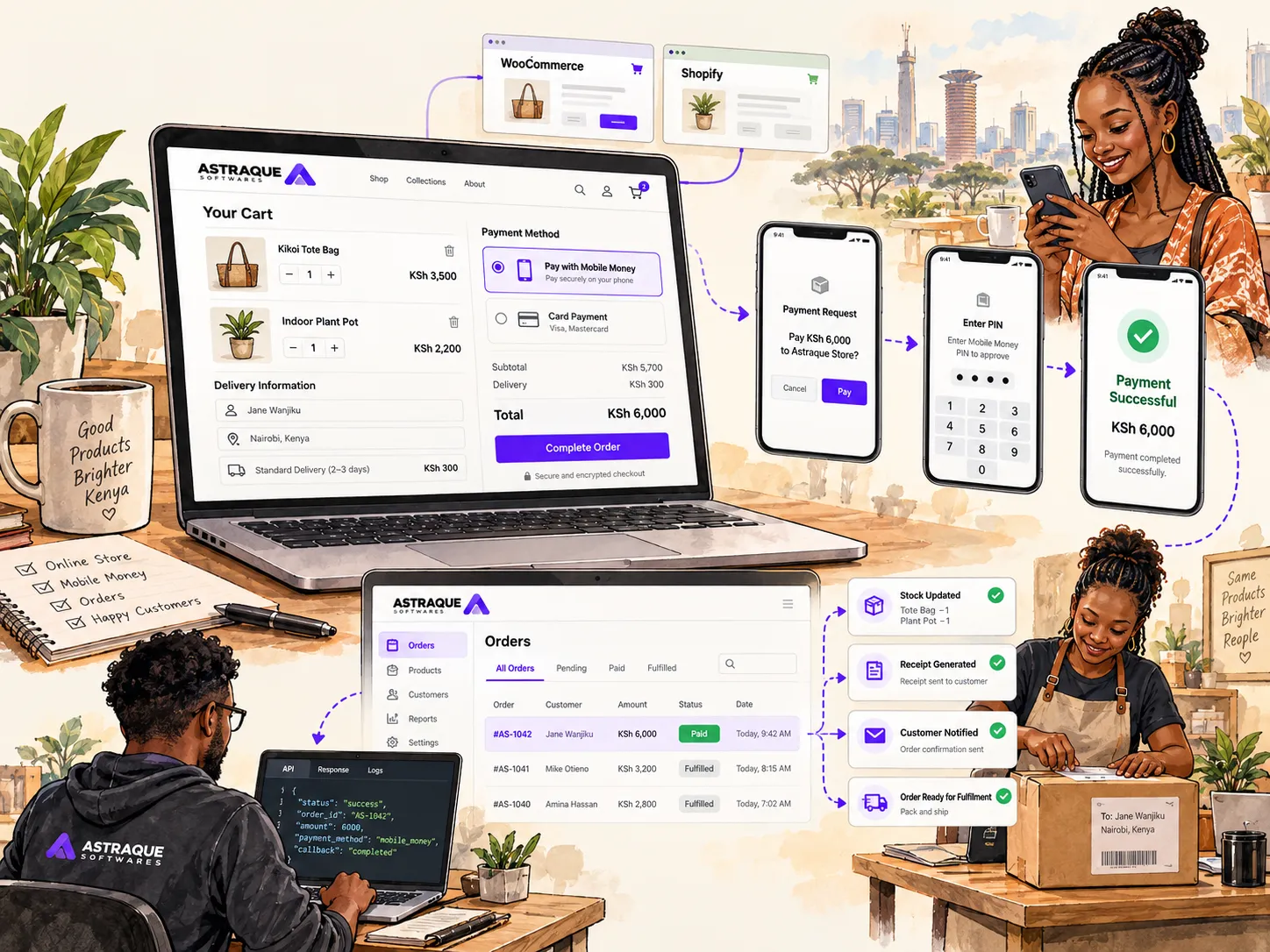
A properly integrated online store should allow the customer to choose M-Pesa during checkout, enter their phone number, approve the payment and have the order confirmed automatically.
Both WooCommerce and Shopify can accept M-Pesa, but the way you implement it is different.
WooCommerce gives developers a great deal of control over the checkout and can connect directly to Safaricom Daraja through a payment gateway plugin or custom integration.
Shopify is more controlled. In most cases, a Kenyan merchant uses a Shopify-supported third-party payment provider that offers M-Pesa rather than connecting arbitrary Daraja code directly to Shopify's checkout.
Understanding that difference will save you a lot of frustration.
What a good M-Pesa checkout should look like
The customer should not need to understand your payment infrastructure.
A normal checkout should look something like this:
- The customer adds products to their cart.
- They proceed to checkout.
- They choose M-Pesa.
- They enter or confirm their mobile number.
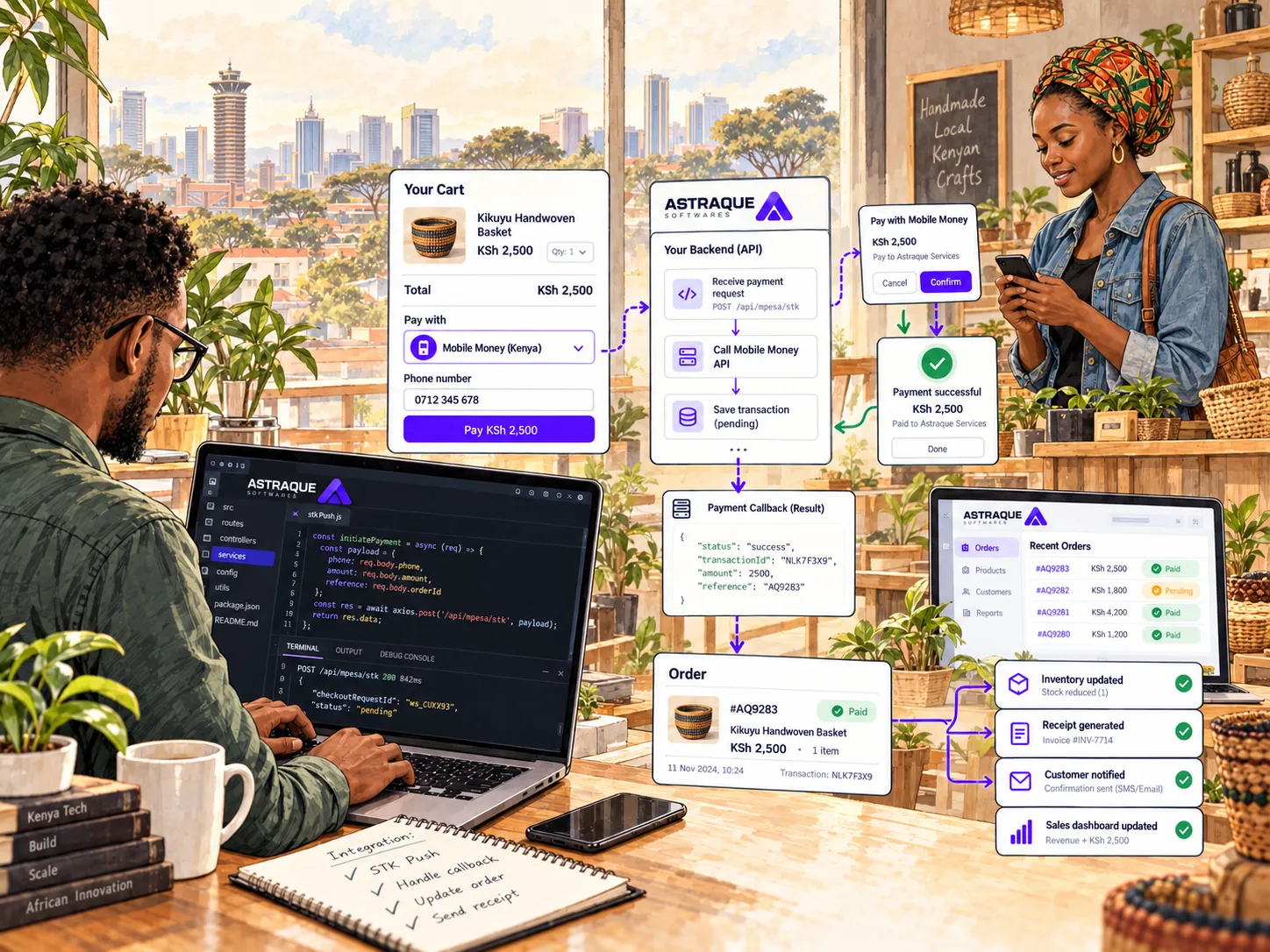
- The store initiates the payment.
- The customer receives a payment prompt on their phone.
- They enter their M-Pesa PIN.
- The payment is processed.
- Your store receives confirmation.
- The order automatically changes to paid.
The customer should not have to send a screenshot.
Your employees should not have to check a Till phone before processing every order.
The website should know whether payment succeeded.
Safaricom provides this capability through Daraja, its developer platform for integrating M-Pesa with websites, mobile applications and other software. Daraja includes M-Pesa Express, which allows a business to initiate a Buy Goods or Paybill payment from a customer's M-Pesa account.
The exact way you connect that payment flow to your online store depends heavily on whether you use WooCommerce or Shopify.
How M-Pesa works with WooCommerce
WooCommerce runs on WordPress and has an extensible payment-gateway system.
Payment methods can be added through plugins that hook into WooCommerce's checkout and order-management system. WooCommerce also provides APIs and developer classes specifically for building payment gateways.
That gives you three broad ways of accepting M-Pesa.
You can:
- install an existing M-Pesa WooCommerce plugin
- use a payment gateway that supports M-Pesa
- build a custom gateway connected directly to Safaricom Daraja
The right option depends on how much control you need.
Using an M-Pesa plugin on WooCommerce
For many small and medium businesses, a WooCommerce plugin is the simplest place to start.
There are currently WordPress plugins that connect WooCommerce to Safaricom Daraja and allow customers to pay using M-Pesa at checkout. Some support Till Numbers, some support Paybill, and some support both.
The general setup usually requires:
- a live M-Pesa Till or Paybill
- a Safaricom Daraja account
- Daraja API credentials
- a secure HTTPS website
- a correctly configured callback
- the WooCommerce payment gateway plugin
After configuration, M-Pesa appears alongside your other checkout methods.
When the customer chooses it, the plugin communicates with Daraja and initiates the payment.
Do not choose a WooCommerce plugin only because it says M-Pesa
Payment plugins handle real money.
Treat them accordingly.
Before installing one, check when it was last updated, whether it supports your current WooCommerce version and whether it works with the checkout system your store uses.
This has become particularly important because modern WooCommerce stores may use the newer Cart and Checkout Blocks, while some older payment plugins were originally written for classic checkout.
WooCommerce has separate integration requirements for payment methods used with its modern checkout experience.
You should also look at:
- how credentials are stored
- whether HTTPS certificate verification is enforced
- how callbacks are authenticated or validated
- whether failed transactions are logged
- whether duplicate callbacks are handled safely
- how pending payments are reconciled
- whether the plugin is actively maintained
A payment plugin can look perfectly fine from the checkout page while being poorly engineered underneath.
You can connect WooCommerce directly to Daraja
WooCommerce's flexibility also makes a custom Daraja integration possible.
Instead of relying on a generic plugin, a developer can create a payment gateway designed around your specific store.
The custom gateway can:
- display M-Pesa at checkout
- collect the customer's phone number
- create the WooCommerce order
- initiate an M-Pesa Express request
- wait for Safaricom's callback
- record the transaction
- change the order status
- reduce stock at the appropriate point
- trigger confirmation emails or messages
- store payment information for reconciliation
WooCommerce officially supports custom gateway development through its WC_Payment_Gateway architecture.
This is usually more work than installing a plugin, but it gives you much more control.
What happens during a WooCommerce M-Pesa payment?
Suppose a customer orders a pair of shoes for KSh 5,500.
WooCommerce creates the order.
At this point, the order should not immediately become paid.
Your M-Pesa gateway sends the payment request.
The customer receives the prompt on their phone.
If they approve it, Safaricom processes the payment.
Your server then receives the payment result and updates the WooCommerce order.
A simplified flow looks like this:
WooCommerce Checkout
↓
Order Created
↓
M-Pesa Payment Requested
↓
Customer Approves
↓
Payment Confirmation Received
↓
Order Marked as Paid
↓
Fulfilment Begins
The key part is the confirmation.
Do not mark an order as paid merely because the payment request was successfully sent.
Those are two different events.
M-Pesa callbacks matter
M-Pesa integrations are asynchronous.
Your website sends a request, and Safaricom later communicates the result to your server.
For Customer to Business payments, Safaricom provides confirmation URLs that allow merchant systems to receive successful payment notifications in real time. Production callback endpoints must be publicly accessible and use HTTPS.
This means your WooCommerce integration needs a reliable server endpoint to receive payment information.
That endpoint should then identify the correct order and update it safely.
If the callback is ignored or poorly implemented, you can end up with customers whose money was deducted while WooCommerce still says:
Payment pending.
Your WooCommerce store should handle unsuccessful payments too
Customers do not always complete the STK Push.
They may:
- cancel the prompt
- enter the wrong PIN
- have insufficient funds
- take too long
- lose connectivity
- enter an incorrect phone number
A good checkout should handle these situations gracefully.
Do not immediately delete the order.
Keep an accurate payment state so the customer can try again where appropriate.
For example:
Pending payment
Processing
Paid
Failed
Cancelled
These states also make support much easier.
If a customer contacts you about a payment, you can see what actually happened instead of guessing.
You can also use a payment gateway instead of direct Daraja
Direct Safaricom integration is not your only option.
Payment providers can sit between WooCommerce and M-Pesa.
For example, Pesapal currently offers plugins and APIs for accepting local and international payment methods, including mobile money, on WooCommerce and other e-commerce platforms.
This approach can be attractive if you also want to accept:
- M-Pesa
- cards
- other mobile-money networks
- additional regional payment methods
Instead of maintaining separate integrations for every payment method, one provider can manage several of them.
The trade-off is that another company now sits in the payment chain.
You should compare:
- transaction fees
- settlement times
- supported payment methods
- refund handling
- reporting
- reliability
- support
- checkout experience
Direct Daraja gives you more control over M-Pesa.
A payment gateway can give you more payment methods with less engineering work.
Neither is automatically the right answer for every store.
Shopify handles payment integrations differently
Shopify is a managed platform.
That is one of its strengths.
It also means developers have less freedom to modify the checkout payment infrastructure however they want.
You generally cannot approach Shopify the same way you would approach WooCommerce and simply write a normal plugin that inserts arbitrary payment processing code into checkout.
Shopify payment processing is built around its supported providers and Payments Platform.
Shopify states that only approved Payments Partners can build payment extensions for its Payments Platform, while custom payment extensions are restricted to eligible Shopify Plus merchants.
For most Kenyan Shopify stores, the practical solution is therefore to use an available third-party payment provider that supports M-Pesa.
How to accept M-Pesa on Shopify
One current option is Pesapal.
Pesapal provides a Shopify payments integration that supports mobile money, including M-Pesa, as well as card payments. Its current setup involves creating a Pesapal business account, obtaining the provider credentials, installing the Pesapal Payments app and activating the required payment methods.
The exact interface can change, but the process generally looks like this:
- Create an account with the payment provider.
- Complete the required business verification.
- Obtain your merchant credentials.
- Install or activate the provider in Shopify.
- Connect your merchant account.
- Enable M-Pesa.
- Test checkout.
- Move into live payment processing.
Shopify recommends checking its current payment-provider availability for your store's country because providers can vary by region and account configuration.
Do that before committing your entire store to a particular gateway.
What the Shopify customer sees
The exact checkout depends on the provider.
A customer may choose the provider at Shopify checkout and then be taken through a payment experience supporting M-Pesa.
For example:
Cart
↓
Shopify Checkout
↓
M-Pesa-enabled Payment Provider
↓
Customer Approves Payment
↓
Provider Confirms Transaction
↓
Shopify Order Updated
From the merchant's perspective, the important part is that the payment provider communicates the result back into Shopify.
You do not want your employees manually matching orders against M-Pesa messages after every sale.
Can you just add your Till Number as a Shopify payment method?
You can create a manual payment method in Shopify and provide customers with instructions for paying outside the automated checkout.
Shopify supports custom manual payment methods, but orders placed using them remain unpaid until the merchant confirms the payment and manually marks the order as paid.
So you could create instructions telling customers to pay a Till or Paybill.
That works.
But it is not the same thing as an M-Pesa integration.
The process becomes:
Customer places order.
Customer manually opens M-Pesa.
Customer enters your Till or Paybill.
Customer pays.
Someone checks whether the payment arrived.
Someone marks the Shopify order as paid.
That may be acceptable when you process a handful of orders.
It becomes increasingly painful when sales grow.
Why direct Daraja on Shopify is not as straightforward as WooCommerce
This is an important distinction if you are deciding which platform to use.
With WooCommerce, you control the WordPress application and can create your own payment gateway plugin that communicates directly with Daraja.
With Shopify, checkout payment integrations are governed by Shopify's Payments Platform.
Shopify requires payment apps to follow its payments-extension architecture and approval requirements.
That means a normal Shopify developer cannot simply say:
"We'll add some Daraja code to the checkout."
The supported payment architecture matters.
This does not make Shopify bad for Kenyan businesses.
It simply means you need to choose the payment provider as part of your Shopify planning rather than treating it as something you will solve afterwards.
WooCommerce or Shopify for M-Pesa?
If M-Pesa integration is one of your biggest requirements, both platforms can work.
But they give you different levels of control.
WooCommerce gives you more flexibility
WooCommerce is particularly attractive when you want:
- direct Daraja integration
- custom checkout logic
- your own payment plugin
- deep control over callbacks
- custom order workflows
- unusual integrations
- lower platform restrictions
You are responsible for more of the website, but you also control more of it.
Shopify gives you less infrastructure to manage
Shopify can be attractive when you want:
- managed hosting
- simpler store maintenance
- a mature e-commerce admin
- predictable platform infrastructure
- faster setup
- an approved third-party provider for payments
The trade-off is that payment integration must work within Shopify's platform rules.
For a typical Kenyan business that simply needs M-Pesa and cards, a suitable supported payment provider may be perfectly adequate.
For a company with unusual M-Pesa workflows or deep integration requirements, WooCommerce or a custom e-commerce platform may provide more flexibility.
Do not choose your platform before thinking about payments
This happens surprisingly often.
A business builds its entire online shop.
Products are uploaded.
Design work is finished.
Delivery is configured.
Everyone is ready to launch.
Then someone asks:
"How are Kenyan customers going to pay?"
Payments should be decided much earlier.
Before choosing your e-commerce platform, establish:
- whether you need M-Pesa
- whether you have a Till or Paybill
- whether you want STK Push
- whether cards are also required
- whether you want direct Daraja
- whether you are comfortable using a payment aggregator
- which countries you intend to sell in
- which currencies you need
- how refunds will work
- how quickly you need settlements
- how orders will be reconciled
Those decisions can affect which platform makes more sense.
Payment confirmation should be automatic
Whether you use WooCommerce or Shopify, the end goal should be the same.
Your website needs reliable information about the payment.
Imagine you receive 150 orders in one day.
A manual process might require somebody to:
- open M-Pesa statements
- search for transactions
- compare amounts
- compare phone numbers
- check order references
- update the store
- notify fulfilment staff
An integrated system can do most of that automatically.
Once payment is confirmed, the website can:
- mark the order paid
- reduce stock
- reserve the products
- generate the receipt
- notify staff
- email the customer
- send an SMS or WhatsApp notification
- update sales reports
That is the real value of payment integration.
Do not use screenshots as proof of payment
If your checkout ends with:
"Send us your M-Pesa screenshot on WhatsApp"
you have created a manual payment process inside a digital store.
Screenshots can be altered.
Employees can make mistakes.
Customers have to wait.
Your fulfilment team cannot reliably automate anything.
A payment provider or Daraja integration allows the store to receive payment information from the payment system itself.
That should be the source of truth.
Make sure orders and payments are separate records
This matters especially when building a custom WooCommerce or e-commerce integration.
One order does not necessarily mean one payment attempt.
A customer could request an STK Push and cancel it.
Then try again.
Then time out.
Then succeed on the fourth attempt.
Your system should not create four fulfilled orders.
A good payment architecture can keep the order separate from individual payment attempts.
For example:
Order #4582
Payment 1 — Cancelled
Payment 2 — Failed
Payment 3 — Timed out
Payment 4 — Successful
The order becomes paid only after the successful transaction.
This makes reconciliation and customer support much easier.
Avoid duplicate payment processing
Payment providers can retry notifications.
Your own system can also retry requests after network failures.
That means your payment processing needs safeguards against processing the same successful transaction twice.
Imagine a successful payment automatically triggers:
- stock reduction
- loyalty points
- a digital download
- an email
- warehouse fulfilment
If the same payment event is processed twice, those actions could also happen twice.
Reliable payment systems therefore use transaction references and idempotent processing to make sure one payment produces one business result.
Customers may never see this engineering.
They will notice when it is missing.
Test the entire checkout before launching
Do not test only one successful payment.
Test what happens when:
- the customer approves the payment
- the customer cancels
- the phone is unreachable
- the customer takes too long
- the payment provider responds slowly
- the customer refreshes the page
- the customer clicks Pay twice
- your server temporarily goes offline
- a callback arrives more than once
- an order has already been cancelled
- the payment amount does not match what you expected
For WooCommerce, also test the exact checkout implementation your store uses.
For Shopify, use the payment provider's available test environment or testing process before accepting real customer payments.
A payment integration is only ready when the unsuccessful paths work too.
Your online store can connect to your physical shop
M-Pesa integration becomes even more useful when your online store is connected to the rest of your business.
Suppose you sell a television online.
The website receives payment.
The order is confirmed.
If your e-commerce store is connected to your POS or inventory system, that same transaction can immediately reduce the available stock.
Your physical shop then knows one unit has already been sold.
Without that connection, you can end up selling the last unit in the shop while somebody else has already paid for it online.
A connected system can keep:
- online stock
- shop stock
- warehouse stock
- orders
- payments
- purchases
- reporting
working from the same information.
Astraque Softwares builds e-commerce stores with M-Pesa
Astraque Softwares builds e-commerce websites for Kenyan businesses using platforms including WooCommerce and Shopify, as well as custom-built stores where the business needs deeper integrations.
Our e-commerce work includes M-Pesa and card checkout, inventory, order management, delivery workflows and integrations with existing POS or stock systems. Astraque also lists M-Pesa integration as one of its core e-commerce offerings.
The right approach depends on the business.
If WooCommerce fits your catalogue, budget and team, M-Pesa can be integrated into the WooCommerce checkout.
If Shopify is a better fit, we can configure a suitable payment-provider approach and build the rest of the store around it.
If neither platform comfortably supports the workflow you need, a custom e-commerce application may make more sense.
The objective is not to force every business onto the same technology.
It is to build a checkout customers can actually use.
Make paying the easiest part of buying from you
A customer has already found your website.
They have browsed your products.
They have chosen what they want.
They have added it to the cart.
They are ready to give you money.
Checkout is the worst possible place to introduce unnecessary friction.
For a Kenyan online store, M-Pesa should feel like a natural part of that experience.
On WooCommerce, that can mean a well-built Daraja gateway or a reliable payment-provider plugin.
On Shopify, it usually means choosing a supported payment provider that already offers M-Pesa.
Whichever platform you use, aim for the same result:
the customer chooses M-Pesa, approves the payment, and your store automatically knows the order has been paid.
Everything after that should happen without the customer needing to send you a screenshot.